
In the event of an outage, a maintenance window, or failed web-token, Cursive has build resilience into the Moodle plugin to ensure that no session–no matter how long or short–isn’t capable of being processed.
Resending Unprocessed Sessions to Cursive
Resending unprocessed sessions to Cursive is easy. We have built a functionality directly into the Analytics modal pop-up with an alert to tell you whether the session is eligible to be resent to the API server.
For any session with data that is unprocessed, click to open the Analytics modal and look for the “alert” icon (below, top right)
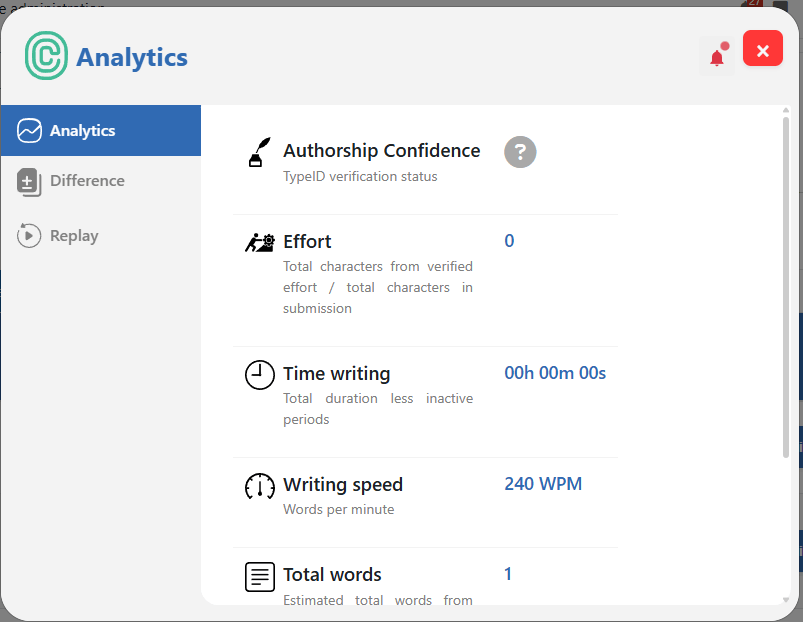
Click this, confirm your selection to resend, and the next scheduled task will do the rest.
Preventing known or planned maintenance window from disrupting scheduled Tasks
To prevent your site from sending sessions during a known maintenance window, you can simply disable the Cursive scheduled task for the duration of the window.
Do this by going to Administration / Server / Tasks / Scheduled tasks, and searching for Cursive on the page.

To temporarily pause Cursive’s scheduled task click to edit and disable.

Once the site is back up and functioning as normal, simply re-enable the task and all queued sessions will automatically resend to the Cursive API the next time cron runs (or if enabled, click “Run now”).
